Monday, February 14, 2011

Search Stories of Kansas

Fourth-grade teacher Sheri Cook reviews a Search Story created by one of her students.
Photo by Susan Arensman
 I wanted to share with you an activity that one of my TRC (Technology Rich Classroom) teachers did with her students. The students are learning about Kansas and reviewing how to identify main idea and details of a story or article. She had the students create Google Search Stories about different aspects of Kansas.

Google Search Stories are videos that are created by putting in search phrases to create your search video. You can have up to 7 searches in your video, you will also be able to add music to your video. It's a very quick way to tell a story or in this case give information about a state.

To check out Mrs. Cook's students Search Stories, click here to go to her YouTube Channel. Enjoy!

Friday, January 14, 2011

State Assessment Prep already?

image by gcouros
It's that time of year again, state assessment prep....I hate this time of year and I know you do too but it's part of teaching (hopefully not forever). However, like the quote above states, you've got to change up how you are doing something if you want different results. That made we want to share some tips I have had success with over the years when preparing my students for the state assessment.  I hope they help you out too.
I recommend starting by reviewing the KCA tutorial with students, best way to do this is giving them practice CETE tests via the TestBuilder throughout the year. If you haven't started doing that, it's never too late.
·          
     Test prep strategies:
·         Reading Activities:
o  Time for Kids Article & the highlighter tool in Word
o   Review questions from stories in TFK with the Quiz document
o   Labette County Resources by Grade level  then subject 
o   Author’s Purpose
o   Activity Search based on Content Area  
o   Practice Assessment, 4th grade
    Sequence Assessment  
·         Math Activities:
o   Great site to practice reading math problems online 
o   Basic Calculator practice site http://www.math.com/students/calculators/source/basic.htm
o   Labette County Resources by Grade level then subject 
o   Practice Assessment
   4th grade
  3-5th grade
o   Brain Teasers
    3rd grade
     4th grade 
    5th grade 
o   Online tools
o   Math games based on Kansas standards
Math Lessons

Tuesday, January 4, 2011

A Little Embarrassed, But Still Sharing Cool Tools


I am a little embarrassed that I haven't posted a blog until now but I do have a great excuse, her name is Maeve Elizabeth Gridley and she came into this wonderful world on Oct. 13th. We just love her and enjoy being her parents, we count our blessings every day.

Ok, enough about that lets get down to business. I have several tools I want to share with you:

Tempinbox is a site that allows you to create a temporary email address to help you avoid spam but I am suggesting that my teachers use it as a way to create student accounts that the teacher can manage for those web2.0 tools that make you have an email address to use them.

 OpenClipArt is a site that is full of free clip art for anyone to use anywhere free of copyright rules. YEAH! I love this site for my teachers and their students to use without having to worry about copyright violations.

Stixy is a site similar to WallWisher that allows you to create an online spot for collaboration. I have seen teachers use this site to share web resources with students, as well as photos and documents. You don't have to have an account to post to a stixy page but you do need one to create a stixy.

Googlios is another tool from Google (hope that is a little obvious due to the name) I am sharing it with apprehension because I haven't use it yet. It is Googles version of a digital portfolio, and I think it has potential but I am not sure that it's worth the work at the elementary level. Here are some examples of college students using it.

Hope you found at least one tool you hadn't heard of before and can use in your classroom tomorrow. 

Thursday, September 16, 2010

TRC Classroom: Trees Project

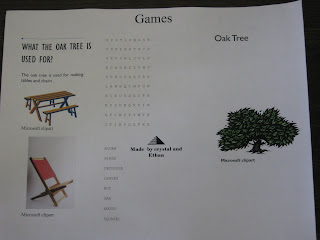
Brochure example created by students

Students of Angie Carter from Clark Elementary in Wichita, Kansas are studying different types of trees from around the world by reading a Time For Kids article called A Forests of the World   from their Treasures Book. After reading the article students paired up and created a 6 panel brochure with the following elements:
  1. Title 
  2. A picture of their tree with a caption
  3. Where the tree grows with a map of location
  4. What the tree is used for & if it's deciduous or coniferous
  5. What types of wild life live in or around the tree 
  6. The final panel information was of the students choosing.  
Some students chose to create word searches or crossword puzzles while other students added interesting facts about their tree. Students were expected to site their sources at the end of their publication. Once the brochures were finished, students shared them with a contact from the Great Plains Nature Center  who would decide if their brochure could be displayed in the center's lobby.

To view the full lesson plan, go to http://trc.usd259.org and scroll down to the Project-Based Lesson Plan Website. The lesson will be posted there soon.

Monday, August 23, 2010

R-E-S-P-E-C-T, What's the Best Way to Teach It?

Image found at Education World.com


I am writing this blog while singing Aretha Franklin's song RESPECT all because one of my teachers asked me to help her find some activities that would help her students have a better understanding about how to have respect for one another as well as her. We started talking and she thought it would be fun to have kids parody Aretha's song to make it applicable to the classroom but as we read the lyrics we rethought that idea because they were a little suggestive.

So I dug into the web and asked my PLN (Personal Learning Network) for ideas and here is what we came up with:

jgustin from Plurk, suggested an activity where students define respect and find images that represent respect to them and put them into animoto to create a presentation. I thought of possibly using VoiceThread instead because it has an easy connection to Flickr creative commons images. 

http://www.micheleborba.com/Pages/BMI05.htm This site suggests that you do one of these activities for each day of the month, I think it would be cool to give this list to the kids and see which one or two they would like to do to show respect to someone in or out of the classroom. They could then report back to the class about how their actions impacted the person they interacted with as well as how it changed their perspective. 

http://charactercounts.org/resources/booklist_search.php This site allows you to search for children books that help to teach Character Education without sounding preachy. I would have the students select a book from the list and do a book talk on it with PhotoStory3 to retell it.

http://www.educationworld.com/a_lesson/lesson/lesson329.shtml This site starts with some ideas to introduce RESPECT to your classroom. Then it gives you 5 lessons for teaching respect. I really liked the Popcorn Party lesson.

Please post your ideas for teaching students respect in your classroom!